
Running an e-commerce business on WordPress sounds simple until you open your WordPress admin dashboard and stare at forty active extensions fighting for server resources. Every store owner eventually falls into the trap of installing an extra tool for every tiny feature request. You install one add-on for a visual slider, another for basic product swatches, another for currency symbols, another for checkout tweaks and another for membership locks. Before you realize it, your website is dragging under excessive database queries, conflicting scripts and fragile updates that break during routine maintenance.
Finding the best WooCommerce plugins is not about collecting as many extensions as possible. It is about selecting a lean, purposeful toolkit where every single plugin performs an indispensable operational job. When you assemble your store stack haphazardly, your hosting infrastructure suffers and your store loses sales.
To understand why this happens, we must examine the hidden technical friction that unchecked plugin installations create behind the scenes.
The Hidden Trap of Plugin Bloat in Modern E-Commerce
When store owners search for the best WooCommerce plugins to improve performance, they often encounter endless lists of forty or fifty unrelated extensions. Every active extension on your WordPress installation adds another layer of complexity to your database and front-end render tree. When a shopper lands on your product page, your server must execute dozens of extra PHP hooks, query post meta tables and enqueue render-blocking stylesheets. Under normal traffic, your site might feel manageable. The moment you run a seasonal promotion or an advertising campaign, that fragile setup buckles.
Checkout pages begin lagging by three or four seconds. Studies show that even a single second of checkout delay causes mobile shoppers to abandon their carts and head straight to competitors.
Why More Add-ons Lead to Lower Conversions and Slower Checkouts
Instead of researching which tools qualify as the best WooCommerce plugins for their exact architecture, merchants stack duplicate tools on top of each other. The damage goes far beyond basic site speed. Running unvetted woocommerce plugins introduces four distinct points of operational failure:
- Cart Abandonment from Currency Friction: International shoppers bounce when they cannot view product prices in their local currency or when unexpected conversion fees appear at checkout.
- Runaway SaaS Costs: Standard recurring billing solutions like official WooCommerce Subscriptions charge upwards of $279 every year before you even configure payment gateway add-ons, draining your operational profit margins.
- Rigid Storefront Templates: Default WooCommerce templates look dated and lack modern product display tools like responsive variation swatches, interactive tables and dynamic hero carousels.
- Back-Office Fulfillment Bottlenecks: The native WooCommerce admin interface offers no native way to filter orders by a specific product or product category. When warehouse staff need to pack a specific production batch or pre-order run, they must comb through hundreds of unorganized order rows by hand.
When these four operational roadblocks collide, scaling your store becomes impossible. You spend your afternoons debugging plugin conflicts instead of marketing your products and serving customers.
Breaking free from this cycle requires shifting away from bloated lists and adopting a unified, high-performance operational architecture.
The Lean Solution: A Curated 5-Plugin Operational Stack
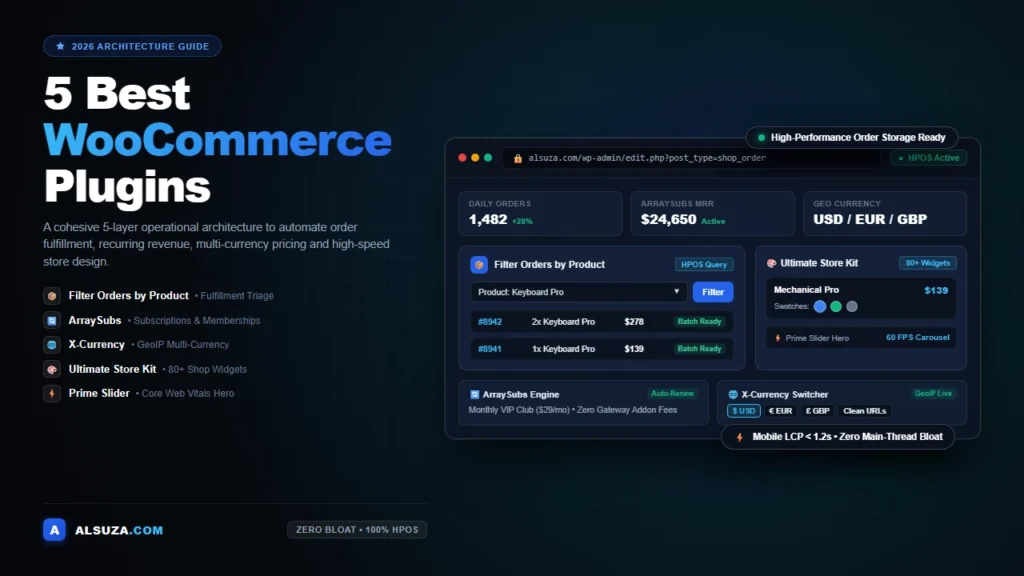
Knowing how to choose the best WooCommerce plugins requires looking at how each component communicates with your database. You do not need thirty different add-ons to build a seven-figure store. In fact, running the best WooCommerce plugins means building a cohesive five-layer operational stack where every tool handles a specific phase of the customer journey.
Instead of generic recommendations, this guide focuses on five essential woocommerce plugins that solve real operational friction:
- Top-of-Funnel Attraction: Engaging shoppers immediately with lightweight, mobile-responsive hero sliders and campaign carousels using Prime Slider for Elementor.
- Storefront Merchandising and Custom Checkout: Replacing rigid default shop layouts with over eighty conversion-focused eCommerce widgets and template builders using Ultimate Store Kit for Elementor.
- Borderless International Commerce: Eliminating cross-border currency friction with automatic GeoIP detection and clean localized pricing via X-Currency.
- Predictable Recurring Revenue: Launching subscription boxes, memberships and automated recurring billing with Stripe, PayPal, Paddle and Mollie using ArraySubs.
- Back-Office Fulfillment Triage: Filtering administrative orders by single products, multiple items or categories in High-Performance Order Storage (HPOS) with Filter Orders by Product for WooCommerce.
When these five components work together, your store runs faster, your marketing converts at a higher rate and your order fulfillment team ships packages in minutes instead of hours.
To give you an immediate overview before we dive into the technical benchmarks, here is how these five best plugins for woocommerce compare across primary capabilities and operational roles.
Quick Summary: The 5 Best WooCommerce Plugins at a Glance
| Plugin Name | Operational Category | Free vs Pro | HPOS Support | Standout Advantage |
|---|---|---|---|---|
| Filter Orders by Product for WooCommerce | Order Triage and Fulfillment | Free / Pro | Full Native Support | Filters orders instantly by product ID, SKU or category with zero front-end script weight |
| ArraySubs | Subscriptions and Memberships | Free / Pro | Full Native Support | Free automatic recurring billing with Stripe, PayPal, Paddle and Mollie without expensive add-on licenses |
| X-Currency | Multi-Currency Switcher | Free / Pro | Full Native Support | Automatic GeoIP currency assignment and clean URLs without messy query parameters |
| Ultimate Store Kit | Elementor Store Builder | Free / Pro | Full Native Support | 80+ Elementor widgets for custom product grids, variation swatches, mini-carts and checkout layouts |
| Prime Slider | Hero Carousels and Merchandising | Free / Pro | Full Native Support | Performance-optimized hero sliders and dynamic WooCommerce product query carousels |
Each of these woocommerce store plugins solves an explicit commercial bottleneck without overlapping code or dragging down your server response times. Deploying the best WooCommerce plugins is fundamentally about picking complementary tools rather than stacking duplicate features.
Before analyzing each tool in depth, let us review the strict engineering criteria used to evaluate these top woocommerce extensions against real-world e-commerce demands.
How We Tested and Evaluated the Best WooCommerce Plugins
Testing e-commerce software requires looking past polished marketing copy and inspecting actual database queries, execution hooks and server overhead. During our benchmark testing, we evaluated more than forty different extensions across multiple staging environments running WooCommerce on modern PHP and LiteSpeed server stacks.
Finding the best WooCommerce plugins involves validating real-world stability under simulated traffic spikes. To ensure our recommendations deliver real commercial results, we measured each candidate against four strict performance and engineering standards:
1. High-Performance Order Storage (HPOS) Compatibility
WooCommerce core has evolved away from storing orders inside standard WordPress wp_posts and wp_postmeta tables. High-Performance Order Storage utilizes dedicated database tables for order lines, addresses and operational meta data.
When testing the best WooCommerce plugins, full HPOS compatibility is non-negotiable. Plugins relying on legacy post meta synchronization slow down database reads, lock tables during peak checkouts and trigger fatal errors during high-volume sales events. Every tool featured in this guide supports native HPOS tables without requiring backwards compatibility synchronization modes. Stores searching for the best WooCommerce plugins must make HPOS readiness their first filter.
2. Front-End Asset Payloads and Core Web Vitals Impact
Google evaluates site speed through Core Web Vitals, specifically Largest Contentful Paint (LCP) and Interaction to Next Paint (INP). Clumsy woocommerce plugins dump massive JavaScript libraries and heavy CSS stylesheets across your entire site, even on pages where their functionality is completely unused.
Selecting the best WooCommerce plugins means prioritizing clean asset hygiene. We ran automated WebPageTest scripts on every plugin to verify conditional asset loading. Our selected best WooCommerce plugins only load assets on pages where their elements actively render. For back-office operational tools, zero customer-facing scripts or styles are enqueued on your catalog, cart or checkout pages.
3. Transparent Licensing vs Runaway SaaS Subscription Traps
The WordPress commercial marketplace is crowded with add-ons charging recurring annual subscriptions that scale aggressively with store revenue. Adding three or four premium extensions can easily push your software maintenance overhead above one thousand dollars per year.
Our search for the best WooCommerce plugins emphasized tools with honest, sustainable pricing models. We prioritized tools that provide substantial functional capability in their free core editions or offer clear, predictable pricing. When picking the best WooCommerce plugins, site owners deserve reliable software that increases profit margins rather than eating into monthly operating cash flow.
4. Direct Operational Utility and Workflow Automation
A plugin must solve a concrete, measurable operational headache. We avoided decorative widgets and superficial marketing badges that look flashy but fail to generate revenue. In our evaluation of the best WooCommerce plugins, workflow automation took center stage. Whether automating currency exchange rates, eliminating subscription payment fees, customizing product grids or speeding up batch order packaging, each tool on our shortlist performs an indispensable job.
Best WooCommerce Plugins for Your Store
With our testing framework and evaluation criteria in place, let us dive into the in-depth breakdown of the best WooCommerce plugins for your store. Each tool has been thoroughly evaluated on production-grade staging environments to verify strict High-Performance Order Storage (HPOS) readiness, lightweight asset loading and reliable store automation.
Now let us examine the first critical tool in our high-performance stack: solving back-office order triage.
1. Filter Orders by Product for WooCommerce: Streamline Warehouse and Fulfillment Triage
Order management in standard WooCommerce becomes chaotic the moment your store processes dozens of daily sales across different inventory lines. While default filters let you sort orders by date range or customer name, WooCommerce provides no built-in way to isolate orders containing a specific product or product category.
This is where Filter Orders by Product for WooCommerce steps in as one of the best WooCommerce plugins for day-to-day administrative operations. Developed by Kowsar Hossain, this lightweight utility integrates directly into your administrative order dashboard to solve fulfillment bottlenecks.
The Operational Problem: Fulfillment Chaos During Batch Shipments
Imagine your warehouse receives a fresh shipment of fifty units for your most popular mechanical keyboard. You have three hundred open pending orders in your store but only forty of those orders contain this specific keyboard.
Without targeted filtering, your fulfillment staff must manually click into individual orders, examine line items and write down order numbers on paper or export massive CSV spreadsheets. This manual triage burns hours of labor, delays customer deliveries and creates shipping mistakes.
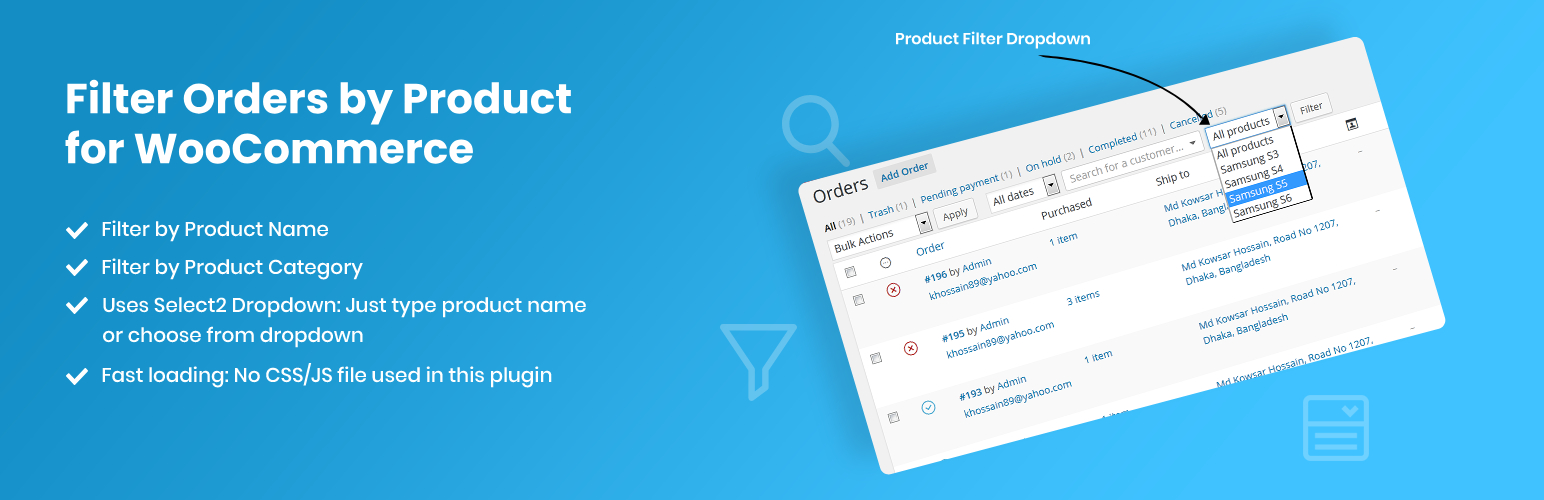
Finding the best WooCommerce plugins for order triage saves hours of manual checking during daily warehouse routines. Filter Orders by Product for WooCommerce solves this problem instantly. A clean dropdown selector appears above your order management table, allowing your team to pick any product or product category and click filter. Within milliseconds, only orders containing that exact product appear on your screen, ready for batch printing, status changes or warehouse dispatch.
Key Capabilities and Technical Highlights
As one of the best WooCommerce plugins for back-office productivity, this tool introduces several high-impact capabilities:
- Single and Multi-Product Filtering: Filter orders by one specific product or select multiple items simultaneously to process composite fulfillment batches.
- Product Category Filtering: Isolate all orders containing items from a specific taxonomy branch, making it easy to triage seasonal collections or perishable goods.
- Full Native HPOS Support: Fully tested with High-Performance Order Storage, executing optimized SQL queries against dedicated order tables without locking your database.
- Custom Order Status Compatibility: Works seamlessly with custom order statuses, allowing fulfillment teams to view orders in processing, pending payment or custom packing states.
- Zero Front-End Footprint: Because the plugin runs exclusively inside
wp-admin, it enqueues zero CSS stylesheets and zero JavaScript files on your storefront, preserving perfect Core Web Vitals scores.
Real-World Store Scenario: Pre-Orders and Product Recalls
Consider a specialty coffee roaster running a seasonal pre-order for a limited single-origin release alongside their regular bean catalog. Stores running the best WooCommerce plugins for operational logistics handle flash pre-orders effortlessly. When roasting day arrives, the operations manager selects the limited roast in Filter Orders by Product for WooCommerce.
The screen instantly displays every order containing that single roast. The manager can bulk-change order statuses to processing, export clean packing slips and dispatch courier shipments without touching orders containing standard blends. The same efficiency applies during product recalls or inventory stockouts, saving valuable customer support hours.
Pros and Cons
- Pros: Blazing fast database query execution; zero front-end script weight; native HPOS compatibility; simple interface requiring zero staff training.
- Cons: Focuses strictly on administrative filtering and does not include built-in shipping label creation or barcode scanning.
Pricing and Licensing
The core version of Filter Orders by Product for WooCommerce is completely free on the WordPress.org plugin directory. Investing time in the best WooCommerce plugins for warehouse management yields immediate returns in labor savings. You can download and test the core tool directly from Filter Orders by Product on WordPress.org to verify why it belongs among the best WooCommerce plugins for order triage. A Pro edition is available for advanced store setups requiring multi-criteria conditional filtering and expanded reporting hooks.
Once your warehouse fulfillment process is running smoothly, the next step in building a scalable e-commerce business is securing predictable, recurring cash flow.
2. ArraySubs: Automate Subscriptions, Membership Access and Recurring Billing
One-time sales create unpredictable revenue spikes and force store owners to spend heavily on customer acquisition every single month. Transitioning your catalog toward recurring subscriptions, monthly product boxes or VIP membership access transforms your business into a predictable revenue engine.
Historically, launching subscriptions on WordPress meant purchasing official WooCommerce Subscriptions at $279 per year, plus additional extensions for memberships and individual payment gateways.
ArraySubs breaks that barrier, earning its place among the best WooCommerce plugins by delivering automatic recurring billing, subscription box builders and membership content gating in a unified platform. If you want a deep dive into launching membership programs, read our detailed tutorial on how to create a subscription website in WordPress.
The Operational Problem: Expensive Subscription Licensing and Fragmented Tools
Many merchants searching for the best WooCommerce plugins for subscriptions hit a wall with expensive licensing. Most subscription plugins on the market lock automatic payment renewals behind high-tier commercial subscriptions. If you want Stripe or PayPal to automatically charge customer cards every thirty days, you are forced to pay ongoing licensing fees before proving your subscription model works.
Furthermore, traditional setups require one plugin for recurring billing, a second plugin for membership access restrictions and a third custom add-on to build custom subscription boxes. Managing three separate extensions creates code conflicts, complicated checkout flows and customer service headaches when renewals fail.
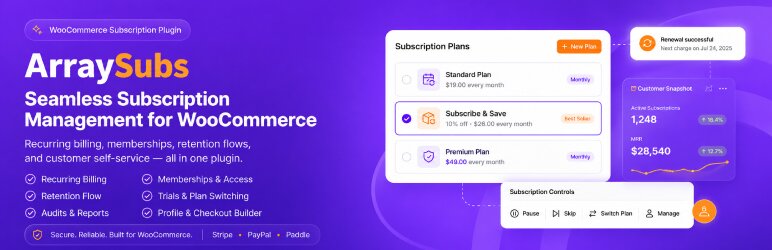
ArraySubs solves this fragmentation by combining automated recurring payments, flexible billing frequencies, subscription box builders and content gating into one coordinated system.
Key Capabilities and Technical Highlights
What makes ArraySubs stand out among the best WooCommerce plugins for recurring revenue is its comprehensive core feature set:
- Free Automatic Payment Gateways: Includes automatic recurring billing for Stripe, PayPal, Paddle and Mollie in the free core version without requiring expensive premium upgrades.
- Interactive Subscription Box Builder: Lets customers build custom recurring boxes by choosing items across categories with live dynamic pricing calculations before checkout.
- Flexible Billing Schedules and Lifetime Deals: Configure daily, weekly, monthly, annual or custom billing intervals, alongside one-time Lifetime Deal (LTD) subscriptions.
- Content Gating and Member Restrictions: Protect WordPress pages, posts, digital downloads and Elementor containers based on subscription status, customer spend or user roles.
- Self-Service Customer Account Portal: Empowers subscribers to pause, resume, cancel, upgrade or downgrade their plans directly from their account dashboard, dramatically reducing churn and support tickets.
- Dunning Management and Grace Periods: Configurable payment retry schedules and renewal grace periods that recover failed transactions before canceling accounts.
Real-World Store Scenario: Launching a Curated Coffee Subscription Box
Subscription brands using the best WooCommerce plugins for recurring orders enjoy lower churn and smoother operations. A specialty roaster wants to offer a monthly coffee subscription box where customers select two bags of whole-bean coffee, choose their roast preference and add an optional merchandise item.
Using ArraySubs, the merchant builds a multi-step box builder in minutes. Shoppers customize their selections, see real-time price updates and complete checkout using automated Stripe billing. ArraySubs schedules the monthly recurring payment, generates renewal invoices and updates the customer account automatically.
Pros and Cons
- Pros: Automatic recurring billing for Stripe, PayPal, Paddle and Mollie included in the free version; comprehensive membership gating; built-in subscription box builder; excellent customer self-service controls.
- Cons: Advanced dunning automation and deep retention analytics require the Pro version; complex multi-tier setups require thorough staging testing before launch.
Pricing and Licensing
Compared to other subscription tools, choosing the best WooCommerce plugins with free payment integrations protects store cash flow. The core version of ArraySubs is 100% free on WordPress.org and provides all automatic payment gateway connections. You can get started by installing ArraySubs on WordPress.org to launch recurring billing right away. ArraySubs Pro adds advanced retention offers, churn mitigation tools and enterprise entitlement controls for rapidly growing subscription brands.
With recurring revenue and order fulfillment secured, your store must be prepared to capture customers across global borders without currency friction.
3. X-Currency: Eliminate Cart Abandonment with Real-Time Multi-Currency Switching
Running international marketing campaigns is one of the fastest ways to scale an e-commerce business. However, driving traffic from the United States, the United Kingdom, Canada and Europe to a storefront that only displays US Dollars results in devastating cart abandonment.
When cross-border shoppers see unfamiliar currency symbols, they hesitate. When they realize their credit card issuer will charge foreign transaction fees and unpredictable exchange markups, they abandon checkout entirely.
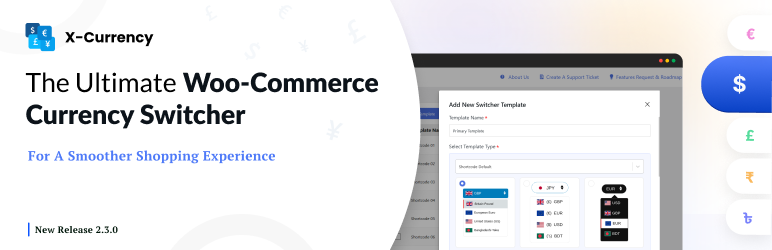
X-Currency firmly establishes itself among the best WooCommerce plugins by eliminating this friction. Developed by Crafium, X-Currency provides automatic GeoIP detection, real-time exchange rate updates and localized payment gateway routing so international shoppers feel right at home.
The Operational Problem: Cross-Border Currency Hesitation and Ugly URLs
Evaluating the best WooCommerce plugins for international sales requires checking URL cleanliness and caching compatibility. Many older currency switcher plugins suffer from two major flaws. First, they append messy query parameters like ?currency=EUR to every single URL on your site. This clutters product links, creates duplicate content headaches in search engine consoles and complicates social sharing.
Second, basic switchers only perform raw mathematical conversions. If a shirt costs $49.00 USD, an automated conversion might display it as €45.37 EUR or £38.82 GBP. These awkward numbers look unprofessional and hurt perceived brand credibility.
X-Currency resolves both issues through smart session management and fixed custom pricing rules.
Key Capabilities and Technical Highlights
Leading store owners consider X-Currency one of the best WooCommerce plugins because it supports manual fixed pricing alongside automated currency conversion:
- Automatic GeoIP Welcome Currency: Detects visitor geographic location instantly and switches product prices to the visitor’s local currency automatically.
- Clean URLs Without Query Parameters: Keeps your URLs pristine by storing currency selections in visitor cookies and session transients instead of appending ugly URL strings.
- Manual Fixed Pricing per Currency: Set psychological prices manually for each supported currency, allowing you to charge clean rates like $49.00 USD, €49.00 EUR and £39.00 GBP.
- Currency-Specific Payment Gateways: Filter payment processors by currency, ensuring customers only see payment methods that actually accept their chosen currency.
- Automated Exchange Rate Syncing: Automatically fetches updated exchange rates on your preferred schedule to protect profit margins against currency market fluctuations.
- Custom Currency and Token Support: Create custom currencies with personalized flags, symbols, code positions and even cryptocurrency representations.
Real-World Store Scenario: Scaling Paid Ads Across North America and Europe
Cross-border stores that implement the best WooCommerce plugins for currency conversion report lower bounce rates and higher average order values. An online apparel brand runs Meta ad campaigns across the United States, Germany and the United Kingdom. When an American clicks the ad, they see USD pricing with credit card checkout.
When a shopper clicks from Munich, X-Currency detects German IP routing, displays €50 EUR flat pricing and offers localized payment methods. British shoppers see £45 GBP with zero foreign transaction anxiety. The store sees an immediate 22% reduction in international checkout abandonment.
Pros and Cons
- Pros: Clean URL architecture; automatic GeoIP detection; manual fixed price points per currency; gateway filtering prevents checkout failures; highly customizable floating and dropdown switcher templates.
- Cons: Advanced design templates and specific custom checkout display rules require Pro styling configurations.
Pricing and Licensing
When curating the best WooCommerce plugins for multi-currency switching, transparent feature tiers matter. X-Currency provides a robust free version on WordPress.org by Crafium, available for download at X-Currency on WordPress.org. The Pro edition unlocks advanced floating switcher themes, expanded currency checkout combinations and detailed exchange margin rules.
Now that international shoppers can browse in their local currency, your catalog needs an engaging, modern storefront to maximize conversions.
4. Ultimate Store Kit for Elementor: Custom Shop Archives and High-Converting Checkouts
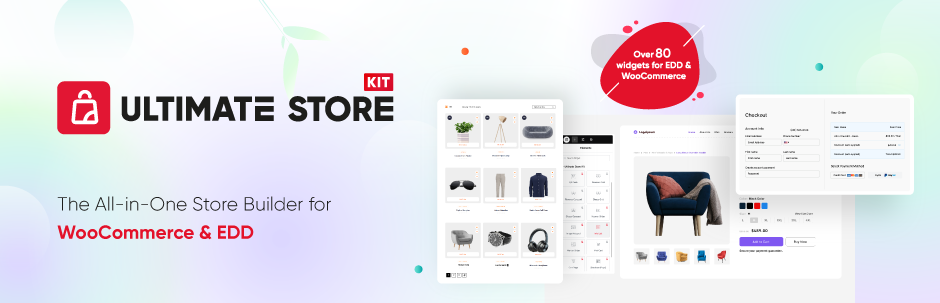
Default WooCommerce storefronts look remarkably outdated. Standard shop grids offer rigid columns, basic add-to-cart buttons and awkward pagination that fails to reflect modern e-commerce user expectations.
Historically, changing your product layouts meant hiring a WordPress developer to write custom PHP template overrides or settling for bloated multi-purpose themes that drag down page speed.
Ultimate Store Kit for Elementor easily qualifies as one of the best WooCommerce plugins for storefront customization by giving store owners complete visual control over their storefronts, product archives and checkout flows without writing a single line of code.
The Operational Problem: Generic Templates that Suppress Conversion Rates
Rather than settling for generic layouts, deploying the best WooCommerce plugins for Elementor allows complete visual control over every step of the funnel. Modern shoppers expect micro-interactions that make browsing effortless: visual variation swatches that change product images on click, interactive quick-view modals, side-by-side comparison tables, persistent wishlists and sticky slide-out carts that allow shoppers to review their cart without leaving the catalog.
Building this functionality traditionally required installing five or six separate plugins. Each plugin enqueued its own CSS and JavaScript files, creating code redundancies and visual inconsistencies across the theme.
Ultimate Store Kit by bdthemes consolidates these essential e-commerce capabilities into a single modular toolkit featuring more than eighty specialized Elementor widgets.
Key Capabilities and Technical Highlights
One reason Ultimate Store Kit ranks among the best WooCommerce plugins is its pure database reader design that never creates bloated custom tables:
- 80+ Specialized Elementor eCommerce Widgets: Includes dedicated widgets for product grids, carousels, lists, tables, accordions, category showcases and review badges.
- Complete Template Builder: Design custom shop archives, single product pages, cart pages, checkout flows, order confirmation screens and user account dashboards inside Elementor.
- Interactive Variation Swatches: Convert boring dropdown variation menus into beautiful color swatches, image previews and button labels.
- Sticky Mini-Cart and Wishlist Integration: Keep shoppers engaged with slide-out mini-carts and instant wishlist saving that encourage repeat visits and larger basket sizes.
- WooCommerce and Easy Digital Downloads Support: Seamlessly handles physical merchandise, digital downloads and recurring subscription items from one interface.
- Pure Database Reader Architecture: Reads existing WooCommerce database tables cleanly without creating bloated custom tables or duplicating product metadata.
Real-World Store Scenario: Redesigning a Cluttered Cosmetics Boutique
Merchants who upgrade to the best WooCommerce plugins for custom store archives see immediate conversion gains. A boutique beauty brand struggling with high bounce rates on product pages replaces their generic theme templates with Ultimate Store Kit.
They implement interactive color swatches for lipstick shades, add a customer review grid with photo verification and replace the default checkout page with a distraction-free two-step layout. Average session duration increases by 35% and overall checkout completion improves significantly.
Pros and Cons
- Pros: Huge library of 80+ widgets; replaces half a dozen single-purpose plugins; drag-and-drop template builder for cart and checkout pages; modular asset manager lets you disable unused widgets.
- Cons: Requires the Elementor page builder; store owners must maintain good caching hygiene and disable unused widgets to maintain optimal performance.
Pricing and Licensing
For Elementor store owners, investing in the best WooCommerce plugins for page design eliminates the need for separate add-ons. Ultimate Store Kit is available as a free plugin on WordPress.org from bdthemes. You can explore widget demos and download Ultimate Store Kit on WordPress.org as one of the best WooCommerce plugins for complete visual store design. Ultimate Store Kit Pro unlocks advanced checkout widgets, custom thank-you page builders, interactive product filtering and premium template designs.
To drive traffic into these high-converting product pages, your store needs captivating above-the-fold visual merchandising.
5. Prime Slider for Elementor: Captivating Hero Merchandising and High-Speed Carousels

The first five seconds a visitor spends on your homepage determine whether they browse your catalog or bounce back to search results. Above-the-fold visual merchandising is the most valuable digital real estate in your store.
However, traditional WordPress slider plugins are notorious speed killers. Heavy slider scripts block the browser main thread, delay Largest Contentful Paint (LCP) and cause jarring Cumulative Layout Shifts (CLS) on mobile screens.
Prime Slider secures its standing among the best WooCommerce plugins by optimizing hero animations for Core Web Vitals while providing exceptional design flexibility. Developed by bdthemes, Prime Slider allows store owners to build responsive hero sliders, product carousels and promotional campaign banners that convert without killing site performance.
The Operational Problem: Sluggish Hero Sliders that Ruin Core Web Vitals
Selecting the best WooCommerce plugins for visual merchandising requires avoiding heavy, render-blocking scripts. E-commerce brands need to highlight seasonal sales, new product drops and flash discounts immediately when visitors land on their site. Yet, installing clunky slider plugins often adds hundreds of kilobytes of un-optimized JavaScript and uncompressed image assets.
When mobile visitors experience stuttering animations or layout shifts while browsing on mobile networks, they leave. Prime Slider solves this dilemma by utilizing lightweight CSS animations, hardware-accelerated transitions and conditional script loading.
Key Capabilities and Technical Highlights
What differentiates Prime Slider among the best WooCommerce plugins for carousels is native WooCommerce query support paired with clean asset management:
- 57+ Slider Widgets and 120+ Ready Layouts: Access an extensive library of hero sliders, dynamic WooCommerce product sliders, video banners and carousel showcases.
- Dynamic WooCommerce Query Integration: Automatically display bestsellers, recently viewed items, on-sale products or specific category collections directly within dynamic slides.
- Optimized for Mobile Gestures: Native touch-swipe support and fluid responsive breakpoints ensure seamless navigation across smartphones and tablets.
- Built-in Image SEO and Alt Controls: Directly configure image titles, alt attributes and structured headings inside slides to support search engine visibility.
- Modular Asset Controls: Disable slider skins and script modules that your store does not use, ensuring only necessary assets are loaded into memory.
- Promotional Countdown and Badge Support: Highlight flash sales and limited-time offers with integrated countdown timers and promotional ribbon badges.
Real-World Store Scenario: Executing a High-Volume Flash Sale
Campaign teams leveraging the best WooCommerce plugins for flash sales capture higher click-through rates while keeping pages responsive. An athletic apparel store prepares for their annual summer sale. Using Prime Slider, the marketing team designs a dynamic WooCommerce hero carousel that pulls on-sale products automatically with live pricing ribbons and bold call-to-action buttons.
Mobile shoppers swipe smoothly between featured items and tap directly into checkout. Because the slider is optimized for modern web standards, mobile LCP scores remain under 1.8 seconds throughout the high-traffic campaign.
Pros and Cons
- Pros: Visually striking templates; smooth hardware-accelerated animations; direct WooCommerce query integration; modular code architecture protects Core Web Vitals.
- Cons: Requires Elementor; having over fifty widgets means merchants should disable unused skins in the settings dashboard to prevent unnecessary asset loading.
Pricing and Licensing
As with all the best WooCommerce plugins featured here, Prime Slider provides generous core features for free. Prime Slider Lite is 100% free on WordPress.org from bdthemes, downloadable directly via Prime Slider Lite on WordPress.org. Prime Slider Pro unlocks advanced multi-layer parallax effects, interactive video sliders and exclusive e-commerce skins.
Now that we have reviewed all five individual tools, let us look at how they connect into a unified, high-converting store engine.
The Unified Blueprint: How These 5 Best WooCommerce Plugins Connect Across the Funnel
The true power of this curated stack lies in how each plugin supports the others throughout the customer journey. Connecting the best WooCommerce plugins into an integrated pipeline prevents plugin sprawl and unifies customer touchpoints. Rather than managing five isolated extensions, you operate a synchronized e-commerce pipeline that guides visitors from discovery to fulfillment.
Here is how the five tools work together in practice:
[ Top of Funnel: Visual Attraction ]
Prime Slider for Elementor
Captures visitor attention with dynamic hero product carousels and seasonal banners.
                  │
                  ▼
[ Middle of Funnel: Consideration and Merchandising ]
Ultimate Store Kit for Elementor
Displays responsive product grids, color swatches, comparison tables and mini-carts.
                  │
                  ▼
[ Bottom of Funnel: Frictionless Localized Checkout ]
X-Currency
Detects visitor GeoIP and displays clean, localized currency with matching payment gateways.
                  │
                  ▼
[ Retention & Growth: Recurring Revenue Engine ]
ArraySubs
Converts one-time shoppers into subscribers and recurring box members with automated billing.
                  │
                  ▼
[ Post-Purchase Operations: Rapid Fulfillment ]
Filter Orders by Product for WooCommerce
Enables warehouse teams to filter orders by SKU, product or category for rapid batch shipping.
The Synergy in Action
Rather than treating extensions as isolated tools, the best WooCommerce plugins work in continuous harmony across everyday operations:
- Discovery: A prospective customer lands on your homepage and sees an engaging, fast-loading hero slider built with Prime Slider showcasing your seasonal product line.
- Browsing: The visitor clicks into your shop archive, exploring custom product grids, filtering by attributes and previewing variation swatches powered by Ultimate Store Kit.
- Localization: Because the shopper is visiting from London, X-Currency detects their UK location and displays fixed British Pound pricing with zero confusing conversion fractions.
- Subscription Upsell: At checkout, ArraySubs offers the shopper an option to receive their favorite product as a monthly subscription box with automated Stripe renewals.
- Fulfillment: When roasting or manufacturing day arrives, your fulfillment staff open the admin order dashboard and use Filter Orders by Product for WooCommerce to isolate every pending subscription box order in one click.
Deploying the best WooCommerce plugins creates an operational loop where marketing, customer experience and backend logistics function as one seamless organism. A well-structured store powered by the best WooCommerce plugins delivers predictable performance at every stage of growth.
To protect this operational stack as your order volume grows, you must follow strict site speed and database maintenance rules.
Performance and Security Best Practices for High-Traffic WooCommerce Stores
Even when running the best WooCommerce plugins, disciplined database hygiene and hosting maintenance are essential. As your store catalog and order history expand, unoptimized databases and misconfigured caches can degrade checkout speeds.
Here are four essential technical practices to keep your WooCommerce store running fast and secure:
1. Configure Dynamic Server Caching and Session Cookie Exceptions
Static page caching delivers enormous speed benefits but dynamic e-commerce stores require precise caching exclusions. If your caching plugin accidentally caches customer carts or checkout pages, shoppers will see other visitors’ items or experience payment submission errors.
Maintaining the best WooCommerce plugins requires auditing caching exclusions on dynamic checkout endpoints. Make sure your caching layer properly bypasses WooCommerce session cookies, cart fragments and dynamic cookies set by X-Currency and ArraySubs. To set up an enterprise-grade caching engine, read our comprehensive guide to the best WordPress cache plugin to boost speed.
2. Complete the Migration to WooCommerce HPOS
High-Performance Order Storage (HPOS) is the single most important database architecture upgrade for WooCommerce in recent years. By moving order records out of the cluttered wp_posts table and into dedicated custom tables (wp_wc_orders), database queries execute up to five times faster.
All five plugins in this guide support HPOS natively. When configuring the best WooCommerce plugins, navigate to WooCommerce > Settings > Advanced > Features and ensure High-Performance Order Storage is actively enabled with authoritative order tables.
3. Disable Unused Modular Widgets and Assets
Both Ultimate Store Kit and Prime Slider provide modular asset managers in their WordPress settings panels. If your store only uses ten specific widgets out of the eighty available in Ultimate Store Kit, disable the remaining seventy widgets.
Disabling inactive modules ensures your site never enqueues unused CSS or JavaScript files, keeping browser render trees clean and improving your Interaction to Next Paint (INP) scores.
4. Protect Customer Checkout Data and Transaction Integrity
E-commerce stores running the best WooCommerce plugins must pair speed optimizations with proactive security. Stores are primary targets for malicious injection scripts and automated credential-stuffing bots. When customers trust your store with payment details, maintaining bulletproof file security and malware monitoring is critical.
Implement real-time server-side scanning and proactive firewall rules to block brute-force attacks before they hit your checkout infrastructure. For step-by-step security hardening, review our practical guide on WordPress malware protection to block attacks and compare essential WordPress file protection plugins to secure sensitive configuration files.
Following these technical rules ensures your store maintains lightning-fast performance under heavy holiday sales traffic. Next, let us address common questions store owners ask when evaluating the best WooCommerce plugins.
Frequently Asked Questions About the Best WooCommerce Plugins
What are the best WooCommerce plugins for a new store?
The best WooCommerce plugins for a new store are tools that establish a lean, conversion-focused foundation without adding unnecessary complexity. Rather than installing dozens of single-purpose add-ons, start with an integrated stack: Prime Slider for homepage engagement, Ultimate Store Kit for custom storefront design, X-Currency for international shoppers, ArraySubs for recurring revenue and Filter Orders by Product for WooCommerce for fulfillment triage. This stack provides complete front-end and back-end coverage with minimal database overhead.
How many plugins should I run on a WooCommerce store?
There is no arbitrary limit on how many plugins a WooCommerce store should run. What matters is the code quality, database query efficiency and asset loading practices of each installed extension. A store running fifteen bloated, poorly coded plugins will lag significantly, while a store running forty well-engineered plugins with conditional asset loading will load in under a second. Focus on picking the best WooCommerce plugins that support High-Performance Order Storage and conditional asset loading.
Which of the best WooCommerce plugins should I install first?
If you are experiencing order fulfillment delays, install Filter Orders by Product for WooCommerce immediately to streamline warehouse operations. If your priority is generating recurring cash flow, start with ArraySubs. For storefront redesigns and international sales, implement Ultimate Store Kit, Prime Slider and X-Currency in a staging environment before deploying them live. Choosing among the best WooCommerce plugins depends on your most urgent commercial bottleneck.
Can I run recurring subscriptions on WooCommerce without expensive extensions?
Yes. While official WooCommerce Subscriptions costs $279 per year before gateway fees, modern plugins like ArraySubs provide automated recurring billing for Stripe, PayPal, Paddle and Mollie in their free core plugin. ArraySubs also includes a subscription box builder and membership content gating, eliminating the need to buy multiple commercial add-ons just to collect recurring payments.
Does using a multi-currency switcher slow down WooCommerce checkout?
A poorly built currency switcher that makes external API calls on every page load or appends messy query strings will slow down your store. However, lightweight tools like X-Currency store converted rates in server transients and manage user preferences through cookies. This approach executes currency conversions in memory with zero noticeable impact on checkout latency.
How do I filter WooCommerce orders by specific product in the admin dashboard?
By default, WooCommerce only allows filtering orders by customer and date range. To filter by product or product category, install Filter Orders by Product for WooCommerce. The plugin adds a native dropdown selector to your WooCommerce order dashboard, allowing you to select any product or category and filter all matching orders in milliseconds with full HPOS support.
Do Elementor WooCommerce addons hurt site speed and Core Web Vitals?
Elementor addons only harm page speed when they load all of their assets globally across your entire website. Quality tools like Ultimate Store Kit and Prime Slider include modular asset managers that allow you to toggle off unused widgets. When combined with proper caching, WebP image compression and conditional script loading, your store can easily pass Google Core Web Vitals while running rich Elementor product displays.
With these operational questions answered, let us summarize our final recommendations and practical action steps.
Final Thoughts: Building Your High-Performing WooCommerce Stack
Building a successful e-commerce business requires striking the right balance between customer experience, global accessibility, recurring revenue and administrative efficiency. Piling dozens of uncoordinated add-ons onto your WordPress installation creates technical debt, slows down your server and frustrates shoppers.
Curating the best WooCommerce plugins transforms your e-commerce platform into a scalable commercial asset. Choosing the best WooCommerce plugins is about building an intentional, cohesive toolkit:
- Use Prime Slider for Elementor to command attention with fast, high-converting hero merchandising.
- Deploy Ultimate Store Kit for Elementor to transform generic archives into customized, modern product showcases.
- Implement X-Currency to welcome international shoppers and eliminate cross-border cart abandonment.
- Automate recurring revenue and membership boxes with ArraySubs without paying hundreds of dollars in annual extension licensing.
- Streamline warehouse fulfillment and batch order processing with Filter Orders by Product for WooCommerce.
By deploying this curated five-plugin operational engine, your store will load faster, convert visitors at a higher rate and run smoothly behind the scenes. Take the first step toward a leaner store by testing these best WooCommerce plugins on staging today. Start by testing each plugin on your staging environment, enable WooCommerce High-Performance Order Storage and watch your store operations scale effortlessly.